Health-GPS

Global Health Policy Simulation model
Global Health Policy Simulation model
| Home | Quick Start | User Guide | Schemas | Models | Architecture | Data Model | Developer Guide | Technical docs | API |
Developer Guide
The Health GPS software is written in modern, standard ANSI C++, targeting the C++20 version and using the C++ Standard Library. The project is fully managed by CMake and Microsoft Visual Studio, the code base is portable but requires a C++20 compatible compiler to build. The development toolset users Ninja for build, vcpkg package manager for dependencies, googletest for unit testing and GitHub Actions for continuous integration (CI) builds and testing.
Building from source
Requirements
To build Health GPS from source, you will first need a C++ compiler compatible with the C++20 standard. We recommend that you use g++ on Linux and Microsoft Visual Studio on Windows (the Community edition is fine).
In addition, you will also need:
- Git
- CMake 3.20 or newer with support for presets (included with Visual Studio)
- Ninja (included with Visual Studio)
Installing vcpkg
We use vcpkg for building and bundling this project’s dependencies so you will need to install it. Follow the instructions on the vcpkg website to get started.
Once you have installed vcpkg, you will also need to ensure that the VCPKG_ROOT environment variable is set to the installation directory.
Downloading the source code
Download the Health GPS source code to your machine, like so:
git clone https://github.com/imperialCHEPI/healthgps
By default, the version of the code that will be checked out is the latest version on the main branch. If you want to build another version, e.g. a release, you next need to change to the healthgps directory and run:
git checkout v1.2.2.0
(for example).
Finally, open the healthgps folder in Visual Studio and hit build. The first build takes considerably longer than normal due to the initial work required by CMake and the package manager.
Windows / MSVC note: If CMake reports missing headers such as
cstdint, cannot findCMAKE_CXX_COMPILER, or fails linking withMSVCRTD.lib, that is a local Visual Studio toolset / environment issue, not a Health-GPS source bug. See Windows MSVC / Ninja build troubleshooting (Mahima Ghosh).
Building Health-GPS
If you are using Visual Studio, you can just open the healthgps folder in your IDE and it should configure the project for building automatically.
Otherwise, you will need to build it via the command line using CMake (which is also used for building tests and documentation).
Several CMake presets are provided for different combinations of build type and operating system. To view the list, run:
cmake --list-presets=all
The following commands will build the project in release mode on Windows and Linux, respectively:
# Windows
cmake --preset='windows-release'
cmake --build --preset='release-build-windows' --target install --config Release

# Linux
cmake --preset='linux-release'
cmake --build --preset='release-build-linux' --target install --config Release
(Release mode produces more optimised code at the cost of longer build times and harder-to-debug binaries. You should primarily build in debug mode for development.)
The HealthGPS binaries will now be inside the healthgps/out/install/[preset]/bin directory.
Building unit tests
To build and execute the unit tests, run:
# Windows
cmake --preset='windows-debug'
cmake --build --preset='debug-build-windows'
ctest --preset='core-test-windows'

# Linux
cmake --preset='linux-debug'
cmake --build --preset='debug-build-linux'
ctest --preset='core-test-linux'
Building API documentation
API documentation for the latest version of Health-GPS is available on the GitHub Pages site.
The public site is published by Deploy Jekyll and Doxygen (release or manual workflow run), not on every push. If that workflow fails at Configure HealthGPS, see Docs deploy troubleshooting.
If you wish to build documentation locally, you need Doxygen installed.
You must enable the BUILD_DOC CMake option, e.g.:
cmake --preset=linux-debug -DBUILD_DOC=ON
Running pre-commit hooks
It is recommended that developers install pre-commit to
make use of the hooks we have installed for this
repository. (Note that this step is only for Health-GPS developers, not end users!)
Once you have installed pre-commit, you should
install the hooks into your local clone of the Health-GPS repository, like so:
pre-commit install
Now, every time attempt to make a git commit, your changes will be checked against the
pre-commit hooks.
Performing static analysis with clang-tidy
clang-tidy is a static analysis tool based on clang, which can identify bugs and
stylistic problems with C++ code. It comes with a helper script, run-clang-tidy, which
allows you to run clang-tidy across your CPU cores.
You need to tell it the path to the compile_commands.json file, which is generated by
CMake, like so (on Linux):
run-clang-tidy -p out/build/linux-debug
clang-tidy can automatically generate fixes for some problems. To do this, pass the
-export-fixes flag with a file path to the script. The fixes can be applied with the
included clang-apply-replacements tool.
clang-tidy is also used by the CI system to lint any new code added to Health-GPS via
a pull request.
HPC Build
Although Health-GPS is compatible with most High Performance Computing (HPC) system, this section contents are specific for using Health-GPS software at the Imperial College London HPC system, which users need to register to get access and support. The HPC is Linux based, therefore users must be familiar with Unix command line and shell script to properly navigate the file system, build programs, run applications, and automate repetitive tasks. See the User Guide for a very brief introduction to Imperial HPC system.
This tutorial describes building Health-GPS using EasyBuild, a framework specially designed to manage (scientific) software on HPC systems, adopted by the Imperial HPC to manage the installation of users’ software on different stacks depending on maturity and quality.
Software can be installed via three stacks:
- local (tools/eb-dev) - allows the building and installation of software in your own user space, one can create locally modified version of a software, or set up a reproducible build environment for you own software development projects.
- development (tools/dev) - a generic stack for software not current available directly from EasyBuild, available on the login nodes but without any guarantees, software on this stack might change on short notice due to required rebuilds.
- production (tools/prod) - a generic stack for software available as an EasyBuild package, built to support specific architectures, and is not available on the login nodes. To view which software is installed, load the ‘tools/prod-headnode’ and search for the software.
Warning Modules name are case sensitive for both script and search.
Note To get access to Imperial HPC and learn more about EasyBuild, users should consider taking the hands-on workshops offered by the Imperial’s Professional Development Programme, specially the Linux command line & large-scale computing courses.
The remaining of this tutorial focus on building a Health-GPS release source code, version 1.2.1.0 or newer, on the Imperial HPC using EasyBuild on the local stack. Installing Health-GPS on the development and production stacks must be done via the Software Install request service. Health-GPS still has dependencies missing in the EasyBuild production pipeline, configuration pull requests are under review, the following script builds on the latest Health-GPS version (1.3.0.0) that is available on the development stack.
# Clear all modules
module purge

# Load the local stack module
module add tools/eb-dev

# Create a new directory, change into that directory
mkdir easybuild/healthgps
cd easybuild/healthgps

# Download EasyConfig config file for Health-GPS from
# https://github.com/easybuilders/easybuild-easyconfigs/pulls
eb --copy-ec --from-pr=16212

# Create a copy of file: healthgps-1.1.3.0-GCCcore-11.3.0.eb for a new release (X.Y.Z.B)
cp healthgps-1.1.3.0-GCCcore-11.3.0.eb healthgps-X.Y.Z.B-GCCcore-11.3.0.eb

# Download the release X.Y.Z.B source code's checksum file locally
wget https://github.com/imperialCHEPI/healthgps/releases/download/vX.Y.Z.B/sha256sum.txt

# Edit and replace the release [version] and code [checksum] in the config file
nano healthgps-X.Y.Z.B-GCCcore-11.3.0.eb

# Check the configuration file syntax and dependencies (dry-run)
eb -D healthgps-X.Y.Z.B-GCCcore-11.3.0.eb

# Install the Health-GPS program locally
eb -r healthgps-X.Y.Z.B-GCCcore-11.3.0.eb

# Check for versions of Health-GPS installed, version X.Y.Z.B should be available
module av healthgps

# Load the newly installed Health-GPS module
module add healthgps/X.Y.Z.B-GCCcore-11.3.0

# Finally, check the Health-GPS location, version and we are done!
which HealthGPS.Console
HealthGPS.Console --version
The Health-GPS build and installation on the HPC is now complete using EasyBuild software management tool. The resulting configuration file should now be checked-in to the easybuild-easyconfigs repository via pull request to create a reproducible build of the application, see the EasyBuild documentation for details.
When using HPC job scheduling software, such as PBS, some thought must be given to how many CPU threads to request, since resource allocation is strictly enforced. Jobs with lower thread counts may have higher priority than large resource hungry jobs, but choose too few and you risk job termination due to using in excess of the original request. Whilst this trade-off is left for you to decide, Health-GPS provides a means of hard-limiting the number of threads its simulations use. Health-GPS uses (oneTBB) for multi-threading, and uses the maximum visible CPU cores by default. Limit threads with the Console CLI flag --threads / -T (0 means no limit). That sets tbb::global_control::max_allowed_parallelism in src/HealthGPS.Console/program.cpp. Example: HealthGPS.Console ... --threads 64.
Note The decision to use oneTBB for multi-threading was taken since the parallel algorithms of the
C++20stanard library offer no means for the software engineer, thus the user, to impose limits on thread usage.
Known Issues
- EasyBuild by default optimises the software for different types of hardware available within a HPC systems, the following compiler flags:
-ftree-vectorize -march=native -fno-math-errnoare typical used for Health-GPS builds using GCC version 11.1 or newer. The cluster contains many CPU types, e.g., AMD rome, and Intel skylake, haswell, ivy, sandy. The mismatch between building and using CPUs might cause performance issues, a workaround is to lock thecpu_type=romein the PBS job script, if you know the build CPU type.
Using Health-GPS Module
The EasyBuild installation described above, installs the Health-GPS software in the users’ own space, usually $HOME/apps/software/healthgps folder, where EasyBuild store logs and other information for reproducibility of the build environment. The $HOME/apps/* directory structure is created and updated by EasyBuild during local software installation and should be left alone by the user. To load a specific version of the Health-GPS software for use, the following steps are suggested:
# Clear all modules
module purge

# Load the software stack, e.g., local
module add tools/eb-dev

# Check for Health-GPS module versions available
module av healthgps

# Load the desirable Health-GPS module version
module add healthgps/X.Y.Z.B-GCCcore-11.3.0

# Use the Health-GPS application, e.g. HLM_France example (data.source is in config.json)
HealthGPS.Console -c ~/HLM_France/config.json -T 8
In general, you should avoid running you own applications on the shared HPC login nodes, the etiquette for working with HPC system is the create and submit jobs to be evaluated by the HPC nodes instead. See the User Guide for details on how to use the installed Health-GPS modules on the Imperial HPC system.
Implementation
The Console host (HealthGPS.Console) is a CLI. Experiment options come from a JSON configuration file (validated against schemas under schemas/), including population size, intervention scenarios, and number of runs. Optional flags include --threads / -T and --dry-run (validate inputs without running trials). See src/HealthGPS.Console/command_options.* and program.cpp.
The same libraries can back a GUI or other host; healthgps-GUI/ in the repo is a separate package and is not required to build the Console.
Composing a Microsimulation
To run an experiment you need:
- A
SimulationModuleFactorywith builders for everySimulationModuleType(useget_default_simulation_module_factoryfromsrc/HealthGPS/simulation_module.cpp). - One or more
Simulationengines (src/HealthGPS/simulation.h), each with aScenario. - A
Runnerexecutive to drive trials and seeds. - An
EventAggregator(typicallyDefaultEventBus) plus monitors/writers.
There is no SimulationDefinition or HealthGPS engine class in the current tree. Construction looks like:
Simulation(factory, shared_ptr<EventAggregator>, shared_ptr<ModelInput>, unique_ptr<Scenario>)
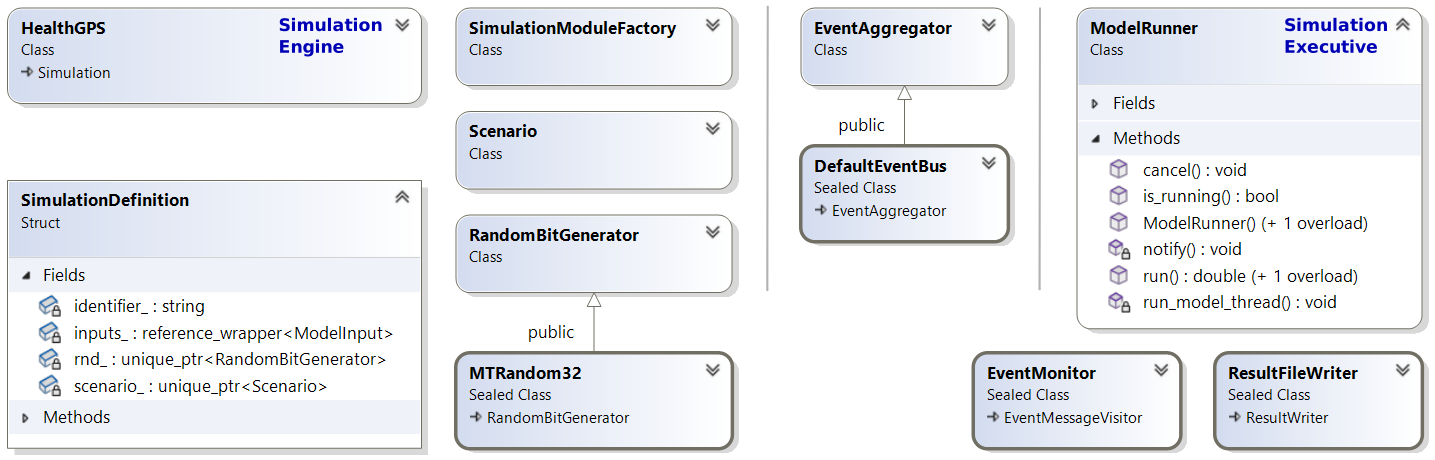 |
|---|
| Composing a Health-GPS Microsimulation |
The Console host (program.cpp) does roughly the following:
- Parse CLI and load / validate JSON config.
- Open
input::DataManageron the data directory; wrap it inCachedRepository. - Register risk-factor model definitions from config onto the repository.
- Build
factory = get_default_simulation_module_factory(repository). - Build
shared_ptr<ModelInput>viacreate_model_input(...). - Optionally stop after
--dry-run. - Create
DefaultEventBus,ResultFileWriter(JSON + CSV + optional income CSVs), optionalIndividualIDTrackingWriter, andEventMonitor. - Create
Runnerwith anMTRandom32master seed generator. - Create
SyncChannel, baselineSimulation, and optionally an interventionSimulation. - Call
runner.run(...)for the configured trial count; then stop the monitor.
Illustrative composition (simplified from the host; see program.cpp for the full path):
auto data_api = input::DataManager(data_directory, verbosity);
auto data_repository = hgps::CachedRepository{data_api};
register_risk_factor_model_definitions(data_repository, config);

auto factory = get_default_simulation_module_factory(data_repository);
auto model_input = std::make_shared<ModelInput>(create_model_input(...));

auto event_bus = std::make_shared<DefaultEventBus>();
auto results_writer = create_results_file_logger(config, *model_input);
auto event_monitor = EventMonitor{*event_bus, results_writer, /*optional tracking*/ nullptr};

auto seed_generator = std::make_unique<hgps::MTRandom32>();
if (const auto seed = model_input->seed()) {
    seed_generator->seed(seed.value());
}
auto runner = Runner(event_bus, std::move(seed_generator));

auto channel = SyncChannel{};
auto baseline = create_baseline_simulation(channel, factory, event_bus, model_input);

if (config.active_intervention.has_value()) {
    auto intervention = create_intervention_simulation(
        channel, factory, event_bus, model_input, config.active_intervention.value());
    runner.run(baseline, intervention, config.trial_runs);
} else {
    channel.close();
    runner.run(baseline, config.trial_runs);
}

event_monitor.stop();
ResultFileWriter writes JSON, a main CSV, and optionally income-stratum CSVs. When individual ID tracking is enabled in config, IndividualIDTrackingWriter writes a separate tracking CSV.
Default result payload fields (from analysis messages) include identifiers (source, run, time), average age, prevalence, risk factors, DALY indicators, population counts, comorbidities, metrics, and series. The combination of source, run number, and model time uniquely identifies a result message.
Module builders are registered like this (matches get_default_simulation_module_factory):
SimulationModuleFactory get_default_simulation_module_factory(Repository& manager)
{
    auto factory = SimulationModuleFactory(manager);
    factory.register_builder(SimulationModuleType::SES,
        [](Repository& repository, const ModelInput& config)
            -> SimulationModuleFactory::ModuleType {
            return build_ses_noise_module(repository, config); });

    factory.register_builder(SimulationModuleType::Demographic,
        [](Repository& repository, const ModelInput& config)
            -> SimulationModuleFactory::ModuleType {
            return build_population_module(repository, config); });

    factory.register_builder(SimulationModuleType::RiskFactor,
        [](Repository& repository, const ModelInput& config)
            -> SimulationModuleFactory::ModuleType {
            return build_risk_factor_module(repository, config); });

    factory.register_builder(SimulationModuleType::Disease,
        [](Repository& repository, const ModelInput& config)
            -> SimulationModuleFactory::ModuleType {
            return build_disease_module(repository, config); });

    factory.register_builder(SimulationModuleType::Analysis,
        [](Repository& repository, const ModelInput& config)
            -> SimulationModuleFactory::ModuleType {
            return build_analysis_module(repository, config); });

    return factory;
}
The factory must provide builders for all required module types before a Simulation can be constructed. For tests you can register stub modules that leave the population unchanged.
Reproducibility
Simulation experiment results reproducibility is a fundamental requirement for a rigorous scientific approach. Health-GPS defines mechanisms to enable reproducibility of continuous runs and batch mode typical of HPC environments. The core mechanism requires traceable inputs, Health-GPS version, and a custom random number seed. The following algorithm is used to manage the master seed for all experiments.
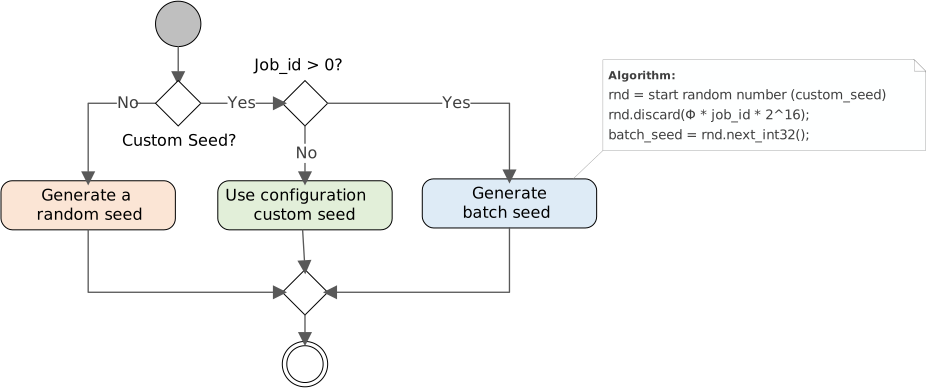 |
|---|
| Experiment reproducibility algorithm (seed management) |
When running the simulation as a single experiment, the solution is trivial using the same seed. In a cluster or HPC environment, reproducibility of parallel simulation is more challenging. See the User Guide for a worked example using Health-GPS on HPC computer arrays to evaluate the same experiment in parallel.
GitHub flow
Health-GPS uses the GitHub flow branching pattern for git. For more information, see the GitHub flow guide.
Related documentation
| Topic | Document |
|---|---|
| Developer docs index | developer/README.md |
| Windows MSVC / Ninja failures | MSVC troubleshooting |
| Architecture | Software Architecture |
| Data model | Data Model |
| Technical guides & plans | Technical documentation index |
| FINCH / income / predictors | FINCH guide |
| Feb 2026 changes | Update report |
| User guide / HPC | User Guide |
| Documentation home | documentation/README.md |
Author: Mahima Ghosh